
Overview
In the SwiftLabel settings you will be able to make changes to how you print labels and add hardware.
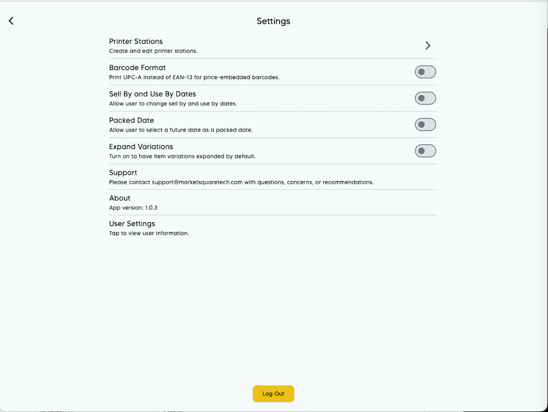
Printer Stations
This is where you can add and manage any printer stations you have in SwiftLabel. For setting up a printer station, please follow the guide here: Printer Setup Guide.
Barcode Format
This toggle is set to off by default and when turned on will print UPC-A barcodes instead of the EAN-13 for price embedded barcodes.
Sell By and Use By Dates
This toggle is set to off by default and when turned on will allow the user to edit the Sell By and Use By dates on the items being printed.
Packed Date
This toggle is set to off by default and when turned on will allow the user to select a date in the future for the Packed Date.
Expand Variations
This toggle is set to off by default and when turned on will expand all of the variations for each item under the Item List.
Support
This is just an area to give the support contact information for any questions or issues with SwiftLabel.
About
This shows the current app version number in case the support team asks you for it.
User Settings
When you tap this field, you will be shown the name and email of the user currently signed in.